



• News
  • Product Roundup
  • Tech Talk
  • Interview
  • Regional Player
  • Report
  • Videos
    • Interview Videos
    • Awards Night Videos
    • Weekly Top News Videos
  • About Us
  • Contact
Friday, March 6, 2026
Top Posts
ASPA in Collaboration with CRISIL to Launch State...
Image King Recognized as One of the Top...
Toyo Ink India Opens New Research Center in...
2nd Edition of the Indian ICT Women Leadership...
Fulcrum Digital Prints adorns prints admirably with country’s...
Brother India Organizes Employee Wellness Session on Cancer...
Imaging Solution Magazine February 2026
Ricoh named a Leader for the third time...
Roland DGA Announces Launch of New UV DTF...
Megain Announces Delay of Geehy Acquisition
Imaging Solution
  • News
  • Product Roundup
  • Tech Talk
  • Interview
  • Regional Player
  • Report
  • Videos
    • Interview Videos
    • Awards Night Videos
    • Weekly Top News Videos
  • About Us
  • Contact
Imaging Solution
Imaging Solution
  • Home
  • News
  • Interview
  • Product Roundup
  • Videos
    • Interview Videos
    • Awards Night Videos
    • Partner Videos
    • Product Videos
  • About us
  • Advertise
  • Contact us
Copyright 2021 - All Right Reserved
Tech Talk

Remanufacturing the Brother HL-L 3290 Series Toner Cartridge TN-227

by Imaging Solution Bureau July 3, 2019
written by Imaging Solution Bureau July 3, 2019 0 comments
1.7K

The Brother HL-L3290 printer engine is based on a color 25ppm, 2400 x 600 DPI laser engine. These machines have a first page out in less than 8.5 seconds, and come standard with 64Mb of memory. The HL-L3290 series also has duplexing built in. New printers in this series come with CMYK starter toner cartridges which are rated for 1000 pages.

There are two different toner cartridges available for these machines. The TN-223 cartridges are rated for 1,300 pages (1400 BK), and the TN-227 cartridges are rated for 2300 pages (3,000 pages BK). The drum unit (C,M,Y,BK) which will be covered in separate instructions is rated for 18,000 pages. There are different part numbers for these cartridges depending on your region. In North America they are as follows:
                       STD                   HY                         Drum
Cartridges: TN223C,M,Y,BK   TN227C,M,Y,BK       DR233CL

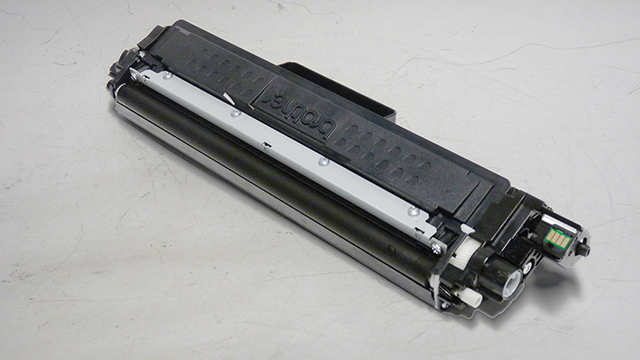
the toner cartridge with the developer roller and chip covers.

Current machines released so far for this series are:

HL-L3210CW
HL-L3230CDW
HL-L3270CDW
HL-L3290CDW
DCP-L3550CDW
DCP-L3551CDW
MFC-L3710DW
MFC-L3750CDW
MFC-L3770CDW

There is a reset gear and a chip on these cartridges. Until a new chip is available, you can re-use the old chip.

Required Tools
Toner approved vacuum.
Phillips Head Screwdriver
Small Common jewelers Screwdriver

Required Supplies
Toner for use in the Brother HL-L3290 series of cartridges.
Developer roller cover (Can re-use OEM if available)
Lint free cotton cloths
Toner magnet cloths
White Lithium Grease

New Chip when available, (Can reuse OEM chip until then)

1) Vacuum the exterior of the cartridge.

2) On the GEAR/CHIP SIDE, (Left side with reset gear on opposite side), remove the two screws.

3) Press in on the two tabs, remove the chip holder (Two separate pieces).

4) Remove the remaining screw and end cap.

5) Remove the 4 gears.

6) Using a large flat head screwdriver, pry off the developer roller gear lock. Remove the gear.

7) Remove the white inner end cap.

8) On the reset gear side of the developer roller remove the 2 screws and remove the end cap. Note that the reset gear stays with the end cap!

9) Remove the black inner end cap.

10) Remove the E ring from the developer roller shaft.

11) Remove the developer roller.

12) Remove the two screws and Doctor Blade. Be careful not to damage the foam DB seal while cleaning.

13) Clean out any remaining toner from the hopper. Pay special attention to the feed roller to make sure it’s clean.

14) Vacuum the doctor blade clean. The doctor blade can be easily cleaned by blowing the excess toner off, and wiping down with a lint free cloth. Be very careful not to leave any lint behind!

15) Inspect the developer roller felts. If they are compressed, (shiny) rough them up with a small screwdriver.

16) Clean the developer roller with a lint free cloth. Do not use any harsh chemicals to clean this roller. Any type of alcohol cleaner will strip the conductive coating off the roller.

17) Fill the cartridge with toner for use in the Brother HL-L3290 series of toner cartridges. Make sure you use the correct color for your cartridge.

18) Install the Doctor Blade and two screws.

19) Re-install the developer roller with the long shaft to the gear side.

20) Install the E-Ring on the developer roller shaft.

21) Clean the gears, making sure that they have no toner on them. This is a good time to also check the gear shafts to make sure there is enough grease. If the shafts appear dry, or the grease is contaminated with toner, clean the shaft and inside of the gear. Replace the grease with white lithium grease.

22) Install the white inner developer roller end cap and screw on the gear side.

23) Install the five gears as shown.

24) Install the small gear lock on the developer roller shaft.

25) Install the larger gear side end cap, and screw.

26) On the opposite side, install the black inner end cap.

27) Set the reset gear as shown. Install the end cap and two screws. The small tab on the reset gear must be seen in the top hole.

28) Install the reset gear end cap and two screws.

29) If available, replace the chip on the cartridge. (The chip can be re-used)

30) Install the chip Holder and two screws.

31) Wipe the cartridge down to remove any remaining toner dust. (Be careful not to touch the developer roller!)

32) Install the developer roller cover and chip cover.

Share 1 FacebookTwitterPinterestLinkedinEmail
Imaging Solution Bureau

IMAGING SOLUTION Bureau: If you have an interesting article/experience/case study related to the ICT industry to share, please send us at editors@roymediative.com

previous post
HP and Vijex Vyapaar Partner to Operate HP’s Showroom for A3 Copiers in New Delhi
next post
Brother USA Introduced new Model in its INKvestment Tank lineup – The MFC-J805DW all-in-one-inkjet printer

Related Posts

Manufacturing Color Toner: Who is doing it? How...

October 1, 2021

Remanufacturing the HP LaserJet Pro M402/MFP M426 CF-226A/X...

December 20, 2019

Remanufacturing the Lexmark CS517 Toner cartridges

October 30, 2019

Remanufacturing the Canon imageCLASS LBP622Cdw Black and Color...

October 12, 2019

Remanufacturing the Brother HL-L 2350 Series Drum Cartridge...

June 6, 2019

Remanufacturing the Samsung ProXpress C301x/C306x series CLT-C/M/Y/K503L Cartridge

February 28, 2019

Remanufacturing the Lexmark CS720 and Ricoh C6003 Toner...

February 4, 2019

Remanufacturing the Xerox Phaser 3330 Toner Cartridge

June 14, 2017

Remanufacturing the HP LaserJet Pro M26 Series toner...

February 25, 2017

Re-manufacturing the HP Enterprise Flow MFP M880 and...

December 1, 2015

Leave a Comment Cancel Reply

Save my name, email, and website in this browser for the next time I comment.

Imaging Solution Global SUMMIT & Awards 2024

Recent Posts

  • Ricoh named a Leader for the third time in Worldwide High-Speed Inkjet by IDC MarketScape

    February 26, 2026
  • Roland DGA Announces Launch of New UV DTF System with Enhanced Media

    February 26, 2026
  • Megain Announces Delay of Geehy Acquisition

    February 26, 2026
  • Xerox showcases next-generation presses and ecosystem innovation at Future of Xerox Production Print 

    February 24, 2026
  • Formujet Plans to Add More Partners, Enhance Reach to T2, T3 & T4 Cities, Continue Focus on Make in India and to Further Consolidate its Leadership Position

    February 20, 2026
  • A-23,1st Floor, Okhla I, New Delhi, Delhi 110020
  • Phone: (+91)9811 346 846
  • royncn@gmail.com
  • marketing@imagingsolution.in

Recent Posts

ASPA in Collaboration with CRISIL to Launch State of Counterfeiting...
Image King Recognized as One of the Top Donors by...
Toyo Ink India Opens New Research Center in Bengaluru

Imaging Magazine

2nd Edition of the Indian ICT Women Leadership Book 2026
Imaging Solution Magazine February 2026
Imaging Solution Magazine January 2026

Our Policies

  • Contact Us
  • About Us

Copyright @2021 All Right Reserved – Designed and Developed by RoyMediative

Imaging Solution
  • Home
  • News
  • Interview
  • Product Roundup
  • Videos
    • Interview Videos
    • Awards Night Videos
    • Partner Videos
    • Product Videos
  • About us
  • Advertise
  • Contact us