



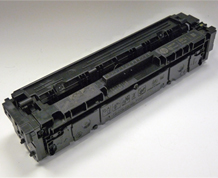
 First released in July 2015, the Pro M252/277 series of color laser printers are based on a 19ppm black & color, 600 Dpi engine. (3600 DPI with RET).The M252 cartridges use a new type of toner that HP calls “ColorSphere 3” and a new type of chip HP calls “JetIntelligence”. Per the HP datasheet, the toner gives a higher yield when compared to the HP 131A, and the new chip technology provides anti-fraud technology.
The first page out is stated at under 11.5 seconds. Standard installed memory for the M252n is 128MB, the M252dw and the M277dw both come standard with 256MB.
New cartridges do not come with a drum cover. They use a new type of box insert to protect the cartridge. It’s a good idea to have your customers save these inserts. See Figure 1
The end caps are plastic welded, and the DB has a left hand threaded screw, but once past the welds are not that difficult to do.
The printers currently based on the M252 engine are the:
HP LaserJet Pro M252n
HP LaserJet Pro M252dw
HP LaserJet Pro MFP M277dw
The cartridges used in these machines are (HP 201A/X series)
CF400A (Black) 1,500 pages $66.99 List*
CF401A (Cyan) 1,400 pages $78.99 List*
CF402A (Magenta) 1,400 pages $78.99 List*
CF403A (Yellow) 1,400 pages $78.99 List*
CF400X (Black HY) 2,800 pages $89.99 List *
CF401X (Cyan HY) 2,300 pages $99.99 List *
CF402X (Magenta HY) 2,300 pages $99.99 List *
CF403X (Yellow HY) 2,300 pages $99.99 List *
* Pricing current as of September 2015. With the new machines shipping with 1500 page black but 700 color starter cartridges, there is sure to be a fast growing demand for remanufactured cartridges!
Required Tools
1) Toner approved vacuum.
2) A small screw driver (Common Style)
3) A Phillips head screwdriver
4) Needle Nose Pliers
5) Flat blade (Common) screwdriver
Supplies Required
Color toner for use in the HP M252/277 series cartridges. (Check for std. or HY)
New replacement chip (Check std. or HY)
New Long Life Drum
New Wiper Blade
New PCR [Optional]
New Doctor Blade [Optional]
Good quality double sided tape 1/8” wide. (3M brand preferred)
Lint free Cloths
Conductive grease
1) With the HP top label facing you, remove the spring from the left side of the cartridge.
2) On the same side, using a flat blade screwdriver, pry out the top of the end cap until you feel the weld give way.
3) Slide the screwdriver inside the end cap to the place indicated and gently pry again until the end cap comes free.
4) Remove the end cap
5) Start to separate the two halves. You will see a small white plastic tab on the drum gear Assembly that blocks you from removing the waste chamber. Lift up on that tab while pulling the end cap out to separate the two halves.
6) Remove the drum from the waste chamber.
7) Remove the PCR. Clean with your preferred PCR cleaner and place aside in a clean area.
8) Remove the two wiper blade screws and the wiper blade.
9) Clean out all the waste toner from the chamber. Make sure all the wiper blade seals are clean.
10) Coat the new wiper blade with your preferred lubricant and install. Install the two screws.
11) Install the cleaned PCR. Make sure to place a small amount of conductive grease on the black PCR holder.
12) On the Supply chamber, remove the two screws from the gear side end cap. Remove the end cap. Be careful of the spring loaded drum drive gear. It will come loose.
13) Remove the two gears.
14) Pry off the white inner end cap.
15) Remove the large and small gears as shown.
16) Slide the developer roller over and remove. Be careful not to lose the 2 round bushings or alignment tab.
17) There are two screws holding the doctor blade in place. The left screw is a normal thread screw, the right side uses a left hand thread screw. Be careful not to mix them up.
18) Vacuum out the remaining toner from the hopper from the slot next to the feed roller.
19) At this point while tight, you can fill the hopper with toner for use in the HP M252 series of printers.
20) Clean the doctor blade foam seals. Install the doctor blade and two screws. Remember the right side uses the left hand threaded screw!
21) Install the developer roller. Make sure both ends have the bushings in place and the left side also has the tab bushing long side up.
22) Install the small and large gears as shown.
23) Press the inner end cap in place.
24) Install the two gears on the feed and developer roller shafts.
25) Install the drum drive gear.
26) Install the end cap and two screws.
27) Cute the chip holder with a flat blade in the two places indicated. Remove and replace the chip.
28) Coat the drum with you preferred lubricant and install the drum in the waste hopper.
29) Place the two halves together. Lift up on the small white drum gear tab while pulling the end cap out to align them properly.
30) Place a small piece of a good double sided tape on the inside of the end cap. Install the end cap.
31) Install the spring.
Taking Test Prints
Supplies Status Page
Press OK to open the menus
Scroll until “REPORTS” appears on the display.
Press OK.
Scroll until “Print Supplies Status Page” appears on the display.
Press OK.
Repetitive Defect Chart:
Cartridge Station Pitch 67.0mm
ITB 66.7mm
OPC Drum 63.0mm
Fuser Pressure Roller 56.5mm
Fuser Sleeve 56.5mm
Transfer Rollers 51.5mm
Registration Roller 44.0mm
Primary Charge Roller 23.6mm
Developer Roller Sleeve 22.6mm
Output Kicker Rollers 11.0mm