



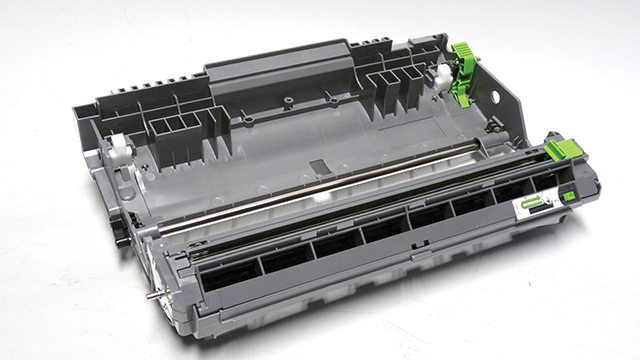
Released in February 2016, the Brother HL-L2350 printer engine is based on a new 30-34 ppm, 2400 x 600 DPI laser engine. These machines have a first page out in less than 8.5 seconds, and come standard with 32-64Mb of memory depending on the machine. All the machines in this series so far also have duplexing built in.
The DR-730 (DR-2400 in EU, DR-2425 in Asia) is rated for 12,000 pages.
It’s interesting to note that on a brand new replacement cartridge the drum shows some wear on each side. It’s outside the paper path so not a big deal, but I found it interesting. See Figure A
Current machines released for this series are:
HL-L2310D
HL-L2350DW
HL-L2357DW
HL-L2370DW
HL-L2370DWXL
HL-L2375DW
HL-L2390DW
HL-L2395DW
DCP-L2510DW
DCP-L2530DW
DCP-L2537DW
DCP-L2550DW
DCP-L2551DW
MFC-L2710DN
MFC-L2710DW
MFC-L2713DW
MFC-L2730DW
MFC-L2750DW
MFC-L2750DWXL
While the cost for new cartridges is not very high, they are fast and easy to do. The DR-730 lists for $120.99*
*As of October 1st 2018
Required Tools
Toner approved vacuum.
Small Common jewelers Screwdriver
E-ring tool, Needle nose pliers, or small flat head screwdriver
Required Supplies
Replacement drum
Conductive Grease
99% Isopropyl Alcohol
Cotton or Foam cleaning swabs
1) Vacuum the exterior of the cartridge.
2) With the drum facing you, remove the “E” ring on the right side of the drum axle.
3) Remove the axle from the left side.
4) Slide the Corona Wire cleaner to the middle of the cartridge.
5) Lift up the two side tabs.
6) Press in on the center tab to release the top cover.
7) Lift off the top cover/corona wire Assembly.
8) Remove the drum.
9) Remove the Transfer roller from the cartridge. The left side has a half bushing that will most likely come out with the roller. Be very careful not to lose this bushing! Clean the transfer roller with compressed air or a toner approved vacuum.
10) Clean and replace the conductive grease from the ½ bushing and the left end of the roller.
11) Install the ½ bushing.
12) Install the developer roller. Make sure the white bushing on the right side fits into its slot. If the gear doesn’t fit into the slot, reseat the gear. It fits on a keyed shaft and if not seated will make the assy. too long.
13) Install the drum, gear side to the right.
14) Clean the corona wire and corona wire grid with 99% Isopropyl alcohol. Make sure not to leave any remnants of the cleaning swab behind especially on the grid as the edges are very sharp.
15) Install the top cover/Corona Wire Assembly. Each side is different so it only fits one way. Make sure the center clip is locked.
16) Install the drum axle from the left side.
17) Install the “E” ring onto the axle.
18) Move the Corona Wire cleaner is in the home position (Right side).
Cartridge Troubleshooting
Dark black line usually about ¼” wide running vertically down the page. The built-in Corona Wire cleaner is probably not in its “Home position” (Right side of the cartridge, the arrow on the cleaner should line up with the arrow on the cartridge. See Figure 20 If the cleaner is in the home position, the corona wire and/or grid is dirty.
Back grounding/ghosting: The transfer roller is dirty, the drum is worn, or the most likely cause comes from the toner cartridge. The waste toner was never cleaned out properly during remanufacturing or the toner is empty and the waste toner is being used for printing. In either case the transfer roller in the drum unit needs to be cleaned and the toner cartridge replaced.
Resetting the drum counter:
There are several machine groups and each has a different reset procedure. The groups are determined by the display type. Each group is listed below:
LED Models
1. Open the front cover.
2. Press and hold GO for about four seconds until all the LED’s light up. Release the GO button
3. Close the front cover of the machine.
5. Make sure the Drum LED is now off.
1-Line LCD Models
1. Close the front cover.
2. Press OK and the UP arrow at the same time
3. Press OK to select DRUM
4. Press the Down arrow to reset the drum counter
2-Line LCD Models
1. Close the front cover.
2. Press OK and the UP arrow at the same time
3. Press OK to select DRUM
4. Press the Down arrow to reset the drum counter
Touch Screen Models
1. Close the front cover.
2. Press “X”
3. Press and hold the drum icon for 5 seconds
4. Press DRUM and then press YES