



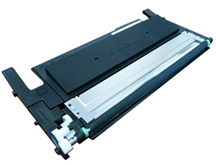
 The Samsung CLP-365printers are based on an 18ppm black and 4ppm color Samsung engine. It has a first page out in less than 14 seconds monochrome and 26 seconds color and has a maximum resolution of up to 2400 x 600 dpi.These machines have a very small footprint at 15” x 12.2” x 8.3” The machines are small and the toner cartridges are also small. (Thin). These are very simple cartridges to remanufacture. With the low stated yield, you could be seeing a lot of these!
The Cartridges used in this series are as follows:
CLT-K406S Black 1,500 pages $68.99*
CLT-C406S Cyan 1,000 pages $68.99*
CLT-M406S Magenta 1,000 pages $68.99*
CLT-Y406S Yellow 1,000 pages $68.99*
CLT-R406 Imaging unit 16,000 pages black 4,000 color $122.99*
CLT-W406 Waste Toner box 7,000 pages black, 1750 pages color $12.99*
New printer’s ship with starter cartridges rated for 700 pages black and 500 pagescolor. These cartridges all use regional chips that must be replaced each cycle. Make sure you have to correct color chip for your printers region.
The printers based on this engine are the:
Samsung CLP-360
Samsung CLP-365W
Samsung CLX-3300
Samsung CLX-3305
Samsung CLX-3305FN
Samsung CLX-3305FW
Samsung Xpress C410FW
Samsung Xpress C410W
Cartridge trouble shooting as well as how to run test pages will be covered at the end of this instruction.
Tools needed
#1 Phillips head screwdriver
Small common screwdriver (Jewelers type)
Thin needle nose pliers
Toner approved vacuum
Chisel type razor knife
Modified soldering iron to create cleaning/fill hole. (See text)
Sturdy razor knife
Small Metal straight edge
Supplies needed
Replacement toner for use in the Samsung CLP-365
Correct color and region Replacement chip
CLP-300 style adhesive fill plug seals
Cotton Swabs
Alcohol
1. On the contact side of the cartridge, remove the two Phillips screws holding the end cap.
2. Pry off the end cap carefully with a small common screwdriver and remove it.Clean the metal bushings with a cotton swab and alcohol.Remove the green plastic bushing.
3. Remove the single screw on the gear side end cap, and with a chisel knife, slice the plastic rivet off.
4. Remove the gear cover.
5. Remove the two screws from the top of the metal cover. The cover also acts as a doctor blade for the roller.Note the two cover/pressureplates on each side. The help provide pressure to the doctor blade. Do not lose them!
NOTE:Be very careful when removing the cover to protect the edge of the doctor blade. Any dent or mark on the doctor blade edge will seriously affect the quality of the print and possibly ruin the cartridge.
6.Remove the washer and developer roller drive gear from the developer roller shaft.
7. Remove the three remaining gears, the two screws and the inner gear plate.
8. Slide the developer roller out. Be careful not to lose the green bushings from either side of the shaft.
9.Wipe down the developer roller with a soft lint-free cloth.Vacuum the entire developing area including the seals of the cover/doctor blade.
10. The toner fill plug in these cartridges is welded in so a hole must be created to be able to clean and fill the cartridge properly.Turn the cartridge over and locate the round mold mark on the smooth fill plug of the cartridge. With a modified soldering iron at full heat, melt a ¾” hole in the cartridge. Be careful not to melt the plastic auger system inside the hopper. With the chisel knife, carefully trim the raised melted plastic from around the hole.
Cheap soldering irons can be modified to use either a copper union as shown or a copper end cap. The soldering iron just needs to have a tip that screws into the end for the end cap or one that is held in place by a side screw as we have shown here to use a union. They can be made to melt a cleaner hole by filing the inside edge slightly to taper it in and leave a pointed edge.
11. Vacuum the chamber clean.
12. Install the developer roller with the respective green separation bushing in position and insert the long keyed side of the shaft through the support, Install the opposite side green bushing.
13. Install the inner gear plate, two screws and four gears.
14. Install the gear side end cap and one screw. The post that was cut will have a small drop of hot glue placed on it at the end of the build.
15. Install the Contact side end cap and two screws.
16. Carefully clean the cover/doctor blade and install it. Fit the individual doctor blade pressure plates on their proper sides and secure with the two screws.
17. Fill the cartridges with the correct color replacement toner for use in the Samsung CLP-365.Install the sealing label over the hole. Check for leaks.
18. To replace the chip, take a small metal straight edge and place it along the cartridge edge as shown. With a sturdy razor knife, cut a line across the chip cover. Remove the straight edge and carefully repeatedly cut along the line until the chip cover has been cut away. Make sure you cut away from yourself in case you slip with the knife!
19. Remove the old chip and slide in the replacement chip as shown. Place a small drop of hot glue on each corner of the chip to hold it in place.
20. Place another small drop of hot glue on the cut post of the gear side end cap.
22. Install the Developer roller cover.
Repetitive Defect Chart:
OPC Drum 188.5mm
Upper Fuser Roller 86.4mm
Transfer Roller 54.64mm
Lower Fuser Roller 50.3mm
Toner feed roller 47.5mm
PCR 37.7mm
Developer roller 26.0mm
Printing test pages:
Demo Page: With the printer in the Ready Mode, Open the printer driver and open the Printing Preferences menu. Click on the Samsung tab and then the Demo Page tab. The demo page will print out