



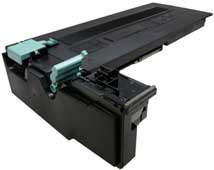
 The Samsung SCX-6555 is a print/scan/copy/fax engine that runs at 1200 dpi with speeds of up to 55ppm and has a first page out in under 8 seconds. The monthly duty cycle is 250,000 pages per month. These machines come in multiple configurations with different paper trays, duplexing, 80Gb hard drives, multi bin mail boxes and finishers all available. These are not small machines with dimensions of 25”(W) x 19”(D) x 24”(H) and a base weight of 98lbs.
The Samsung toner cartridge SCX-D6555A is rated for 25,000 pages, and has a list price of $87.99.00 USD. There is a separate toner and drum cartridge used in these machines. The drum unit part # SCX-R6555A is rated for 80,000 pages and will be covered in separate instructions.
Figure A shows a basic diagram of the printing process used in this engine. All very basic so there is no need to go into the actual theory.
The chips on these cartridges need to be replaced each cycle.
These are extremely easy cartridges to do. They take minimal time and really don’t need to be tested as there is nothing to wear out. All the normal wear parts like the PCR, developer roller etc. are in the drum unit. These cartridges are just a supply hopper with a waste chamber. There is one part that can wear on multiple use cartridges you do need to be aware of though. This point is covered at the end of the instructions.
Current Machines based on the Samsung SCX-6555 engine are:
Samsung SCX-6545N
Samsung SCX-6555N
Cartridge troubleshooting/information are covered at the end of this article.
Supplies required:
560g toner for use in the Samsung SCX-6555
Replacement chip
Tools Required
Phillips head screwdriver
Small common screw driver
Vacuum approved for toner
1) Remove the two screws located on the waste chamber.
2) Remove the screw that is located under the colored plastic handle.
3) Remove the waste chamber. There are 2 small gears that will come loose. Be careful not to lose them. Slide the cover open and vacuum/blow the waste chamber clean.
4) Remove the toner fill plug.
5) Dump the bulk of the remaining toner out of the cartridge. Vacuum/blow out the toner supply chamber clean.
6) Fill the cartridge with toner for use in the Samsung SCX-6555 toner cartridge, replace the fill plug.
7) Install the two gears on the hopper.
8) Install the waste chamber and three screws.
9) Press in on the 4 tabs on the opposite side of the cartridge. Remove the end cap.
10) Replace the chip on the cartridge. Note that the OEM chip is a contact type chip that uses a cable and RJ-45 type connector. Press in on the board locking tabs and then also the locking side tabs on the connector.
11) Snap the connector in place. Make sure the connector protrudes the correct distance from the end cap. (It will be correct when it snaps in place).
12) Install the end cap so that all 4 tabs lock it in place.
Cartridge troubleshooting
On this type cartridge, there is nothing really that can go wrong print wise, but there is one plastic failure point you need to be aware of. After a few cycles, the plastic clip indicated in Figure 17 can wear and not allow the handle to lock in place properly. If this happens you will get a “Cartridge Not installed” message. This can sometimes be fixed by reforming the clip with a plastic welding iron or a low wattage soldering iron, but at best this is a temporary fix. The cartridge should really be replaced when this happens.
There is really not much that can go wrong with these cartridges. From our experience, it is a safe bet that most of the problems will come from the drum unit.
Image Defect Chart
Developer roller 39.25mm
PCR 43.96mm
Transfer roller 57.14mm
OPC Drum 94.3mm
Upper Fuser roller 125.6mm
Lower Pressure roller 157mm