



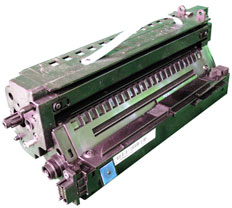
 First released in June 2008, the Samsung SCX-6555 series of printers are based on a 55ppm, 600dpi MFP engine (1200 x 1200 Enhanced). The first page out is rated at under 8 seconds. These MFP machines print, copy, scan and fax. They come with 256Mb/512Mb of memory and have an 80GB hard drive installed.
The user interface is a high resolution TFT LCD color touch screen. It’s a 7” screen with a resolution of 800 x 480. For speed and accuracy the laser unit is somewhat unique in that it has a four beam laser scanning unit. I could not find any information from Samsung on this system, but my guess is it allows a much faster print. Figure A shows the positioning of all the main cartridge and printer parts in the machine
The toner cartridge (SCX-D6555A) is rated for 25,000 pages and has been covered in a separate instruction. The drum cartridge covered here (SCX-R6555A) is rated for 80,000 pages. The chip for the drum unit is a worldwide version meaning it works in all regions. Printers based on this engine are the MultiXpress SCX-6555Nx and SCX-6545.
The drum cartridge SCX-R6555A (80,000 pages) is listed for $191.99*.
*As of 8/1/2014
Required Tools
1) Toner approved vacuum.
2) A small Common screw driver 3) A Phillips head screwdriver
4) Needle nose pliers
Required Supplies
Developer for use in the Samsung SCX-R6555A drum unit
Replacement chip
Replacement drum
Replacement wiper blade
Conductive Grease
Drum lubricating powder
NOTE: All the screws that will be removed in this cartridge are the same size so they can all be grouped in one place if desired.
1) Place the cartridge with the handle on top. Remove the 2 screws on the PCR assembly. The assembly cannot be removed yet.
2) On the right (contact) side, remove the five screws.
3) Remove the two screws on the connector. Move the wires and connector out of the way.
4) Remove the upper end cap. (It has a tight fit so take your time)
5) Press in on the four tabs and remove the lower end cap.
6) Remove the floating drive gear and the 4 point star gear.
7) On the opposite side remove the two screws.
8) Remove the four point drive gear. Pull it straight out with a pair of needle nose pliers.
9) Press in on the single large tab and remove the large end cap.
10) On the same side, remove the four screws and the inner end cap.
11) Locate the small wire harness. Pull the connector apart.
12) Separate the drum/waste hopper from the developer section.
13) On the drum section, remove the two screws from the PCR assembly. They are located one on each side of the cartridge.
14) Remove the PCR assembly. Pull up from the auger/wire harness side.
15) Separate the PCR and cleaning roller from the holder (Slide the PCR to one side to remove) vacuum or blow off the cleaning roller, and wipe the PCR down with a lint free cloth. Do not use any cleaning chemicals on the PCR. Put the PCR assembly back together and place aside.
16) Remove the axle drive gear.
17) Remove the two small black gears.
18) From the gear side, pull the drum axle out by grasping the axle.
19) Remove the drum.
20) Remove the auger and clean it off.
21) Gently pry up the contact plate locking pins and pull the plate away from the cartridge. Slide the erase lamp assembly out of the cartridge. Its fits tightly so you may need to press it out from the inside.
22) Remove the two screws and the wiper blade. Note that the wiper blade fits into the right side wall of the waste chamber. Slide it out to the left to remove.
23) Clean out any remaining waste toner. Make sure the felt seals are clean and intact.
24) Install the wiper blade back into the waste chamber by sliding it into the right side wall. Drop it in place and install the two screws.
25) Note the semi round top inner section of the erase lamp assembly. Align it with the hopper wall and press the assembly into place. The right side fits into the cartridge wall just as the wiper blade did. The left inside part of the lamp assembly should be flush with the cartridge wall.
26) Install the auger long shaft side in and the two auger gears. Put a small piece of tape across the gears to hold them in place.
27) Place the drum into the waste chamber, gear side to the wire harness side. Slide the drum axle in place from the gear side and rotate until the roll pin in the axle shaft fits into the slot on the cartridge wall.
28) Install the washer on the drum axle shaft and press the contact bar back into place. Use a small common screwdriver to press the locking tabs into the pins and around the drum axle.
29) Install the cleaned PCR assembly. Insert the two top screws and the 2 side screws (one each side).
30) On the supply hopper, remove the four top screws.
31) Slide the toper port to the right or open position.
32) Carefully pry up the cover from the front edge. There are four small tabs and 3 alignment pins there. Pry the cover up from the sides roll it up and remove.
33) Clean out all the old developer.
34) Pour in the new developer.
35) Align the top cover front edge so the tabs and alignment pins are in the proper location and insert the front edge of the cover. It helps to press the tabs in with a small screwdriver.
36) Rotate the cover down pull the toner port cover out slightly and snap over the cover and hopper edges. Make sure the cover moves from side to side easily. In this picture, the closed position is to the right side.
37) Install the four screws on the top cover.
38) Align the drum/waste section pins so they fit into the supply hopper Rotate down so the drum is close to the magnetic roller.
39) On the right (non-gear) side, press the two wire harness connectors together. Route the wires out of the way as shown and tuck the connector into its slot.
40) On the gear side, install the flat four point gear and the floating drive gear.
41) Install the lower end cap and screw. Make sure all the tabs lock and that the wires do not get pinched.
42) Install the two screws and the main connector. Make sure the wires are routed properly and are tucked away so they do not get pinched.
43) Remove the tape holding the two small auger gears in place.
44) Install the inner end cap and four screws.
45) Install the opposite side inner end cap and four screws. Make sure the contact fingers touch the contact bar.
46) Install the auger side end cap and two screws.
47) Install the drum drive gear by pushing it straight in the gear is keyed and should not be forced.
48) Install the large end cap and four screws.
49) Remove the old chip and replace with the new one. The antenna must face up. This is an RF chip and does not have any physical contacts.
50) If available, cover the cartridge with the OEM paper/foam drum cover.
Repetitive Defect Chart
See Figure A
Part Period
Lower Pressure Roller 157.0mm
Upper Fuser Roller 125.6mm
OPC Drum 94.30mm
Transfer Roller 57.14mm
PCR 43.96mm
Magnetic Roller 39.25mm