



By Mike Josiah and the Technical Staff at Uninet
 First released in May 2014, the Samsung Xpress M2020 series of printers are based on a 21ppm, 1200 Dpi engine. The first page out is stated to be under 8.5 seconds, and all “W” models so far come with Wi-Fi, Samsung Mobile print, Google Cloud Print, Airprint and NFC features built in.
The M2020 comes with 64MB memory and the M2070 comes with 128MB memory installed (Fixed amounts. Both have a duty cycle of 10,000 pages per month.
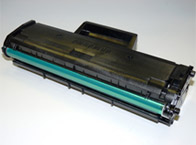
These cartridges do not have a built in drum cover, but do come new with an orange plastic cover. (See Figure 1)
The replacement cartridge it self is rated for 1,000 pages at 5% coverage (ISO 19752). The starter cartridge is rated for 500 pages.
Printers based on this engine:*
Samsung Xpress M2020W
Samsung Xpress M2021W
Samsung Xpress M2022
Samsung Xpress M2022W
Samsung Xpress M2070F
Samsung Xpress M2070FW
Samsung Xpress M2070W
Samsung Xpress M2071FH
Samsung Xpress M2071W
Samsung Xpress M2070FW
* As of 4/1/15
Required Tools
1) Toner approved vacuum.
2) A small Common screw driver 3) A Phillips head screwdriver
4) Needle nose pliers
5) Chisel blade knife
6) Electric drill
7) #29 drill bit (See supplies needed below)
Required Supplies
Replacement toner for use in the Samsung M2020
Dedicated Wiper Blade
Replacement chip
Conductive Grease
Drum lubricating powder
If using the #29 drill it, we recommend #8 x ¼” self-tapping screws. If not make sure you match the drill size to your screws and the screws cannot be longer than ¼” (6.35mm)
1) Place the cartridge with the handle facing away from you. Slice off the 3 plastic rivets with a Square Xacto type blade on the contact (chip side) end cap.
2) Gently pry off the end cap. The end cap looks like it’s in two pieces but it’s not. Be careful not to break it when removing!
3) On the opposite side of the cartridge, Slice off the 4 plastic rivets with a Square Xacto type blade.
4) Gently pry off the end cap. This one is actually in two pieces.
5) Lift off the waste chamber.
6) Slide the drum axle out from the hub side and remove the drum.
7) Remove the PCR. Make sure the holders stay in place!
8) Remove the two screws and wiper blade from the waste chamber.
9) Remove the large drive gear.
10) Clean out any remaining toner from the waste chamber. Be careful to keep the wiper blade seal clean.
11) Re-install the wiper blade and two screws
12) Clean the PCR with your normal PCR cleaner and install in the cartridge. Make sure the guides fit in place and the rollers fit into the holders properly.
WARNING: Do not clean the OEM PCR with alcohol, as this will remove the conductive coating from the roller. If the PCR is an aftermarket, follow the cleaning methods recommended by the manufacturer. If the PCR is an OEM, we recommend it be cleaned with your standard PCR cleaner.
13) Install the hub gear side first, slide the axle through the gear and cartridge wall.
14) Install the large drive gear.
15) Remove the 3 gears as shown and place aside. Remove the developer roller gear by squeezing the tab on the shaft.
16) Remove the Developer Roller inner plate and screw on the gear side of the cartridge. Remove the developer roller sleeve.
17) Until new replacement fill plugs are available, leave the plug in place. The OEM plugs are very brittle and break easily.
18) Remove the 2 screws on the doctor blade and blade.
19) Clean out any remaining toner from the hopper through the developer roller/DB hole.
20) Clean the feed roller and any remaining toner from the hopper seals.
21) Fill the hopper with toner for use in the M2020 cartridge.
22) Clean and Re-install the doctor blade and two screws.
It is highly recommended that the Doctor Blade be cleaned. Failure to do so will cause streaking. Dampen a cotton swab with alcohol, and clean the blade. Be careful not to press too hard and damage the blade. If the blade has a heavy buildup of toner on it, clean it with Acetone, and then alcohol.
23) Install the developer roller.
24) Install the inner plate and screw.
25) Install the 4 gears as shown in the order indicated. You may need to press on the Auger gear to seat gear # 4 properly.
26) Place the two halves together. Make sure the two springs fit in their respective points.
27) Install the gear side end caps (two pieces) Install the top piece first.
28) Drill hole where the four rivets were and install the screws.
29) Install the replacement chip on the contact end cap by sliding it out from the inside of the end cap. Replace the chip making sure it’s seated properly.
30) Install the end cap, drill the three holes and install the screws.
31) Install the drum cover on the cartridge.